Visual Story Mapping
Your life, organized visually.
Memoir Builder turns scattered notes and photos into a structured narrative. Pin fragments, arrange chapters, and export a polished manuscript — without ever facing a blank page.
Start Your BoardTwo Levels of Organization
Chapters, then the details underneath them
Your main board lays out the big picture: the major periods and turning points of your life, as chapter cards across columns. Each chapter has a title, a description, and a status — Not Started, Started, Pending, or Done — so you can see the shape of your whole story at a glance.
Open any chapter and you drop into its own Chapter Details Board, seeded with four starter cards — Content, References, Footnotes, and Images — ready for the actual material that chapter needs. Add, rename, delete, or reorder them however fits the way you want to build that chapter.

Built for the Details
Everything a chapter needs
Attach Anything
Upload a file, add a link to something already in Google Drive or iCloud, or point at a file on your own computer without copying it. Uploads count toward a free 300MB / 150 file allowance — links and remembered files don't.
Quick Capture, Dictate, or Upload
Tap the microphone icon in the top bar on any device you're logged into, phone included, and just start talking — it lands in your Stream of Consciousness chapter, ready to sort later. Dictate straight into any card with the built-in editor, or upload a recording (MP3, M4A, WAV, or OGG) and turn it into text. Flag anything unfinished by setting it to status=Pending and circle back anytime to find and complete it. Used up your free transcriptions? Memoir Builder keeps your recording and offers a free web tool to turn it into text, ready to attach to your card.
Keep Every Card in Order
Every photo, document, recording, or link on a card has its own menu — Rename, Move, Download, and Delete. Move an attachment up or down the card, or send it to another card in any chapter. Put your best photo first and it becomes the card's picture. On a phone, press and hold an attachment to open its menu.
Your AI Assistant
Meet Aion
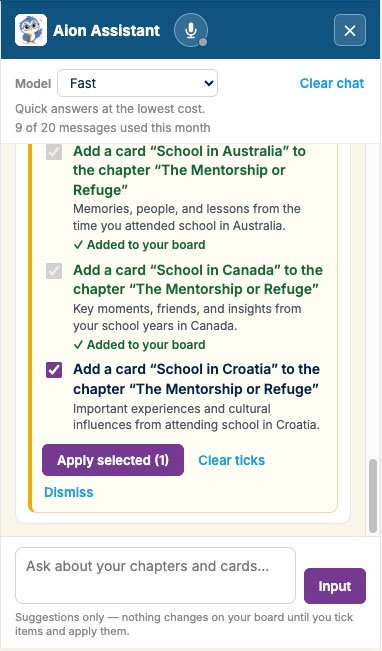
Aion helps you plan your memoir: it picks a template, suggests chapters, and breaks a chapter into cards for you — always shown as suggestions first. Nothing on your board changes until you tick the ones you want and apply them.
Aion sees your board's titles, descriptions, and file names — never the contents of your files.
Seamless Assembly
Export a polished manuscript
Export the whole board, a single chapter, or just one card — from an Export link right on each chapter and card. Free exports come as PDF or Plain Text (opens anywhere, phones included); Bronze adds MS Word and RTF. Coming soon: Audio Book, your memoir read aloud as a single MP3.
A whole-board export includes a table of contents built from your chapter order, with clickable links straight to each chapter's section, and every card's content assembled underneath it. Attachments can be embedded as-is with links or fully merged into flowing text, whichever you prefer — and if you've left any status=Pending along the way, your export includes a consolidated checklist of everything still flagged as unfinished.

Starter Templates
So many ways to start
Every board starts with a Stream of Consciousness column too — a catch-all spot to jot down a memory the moment it comes to you, before you've decided where it belongs. Switching templates later adds to your board; it never deletes existing work.
Timeline Memoir
The default and simplest shape: Beginning, Middle, Ending.
Coming-of-Age
A childhood-to-adulthood arc: the normal world, the loss of innocence, rebellion, mentorship, and departure.
Travel / Adventure Memoir
A journey arc: the call to wander, culture shock, the physical ordeal, connection, and what you really found.
Thematic Memoir
Built around a single life-defining theme: the catalyst, the struggle, the breakthrough, rebuilding, and the truth you took from it.
Celebrity / Public Figure Memoir
A public-life arc: the spark, the breakthrough, the cost of fame, the honest version behind the image, and your legacy.
Confessional Memoir
For telling a story you've kept private: the burden, the exposure, the fallout, integration, and finding peace with it.
Scrapbook
A visual, caption-led memoir built around images first — arrange the photos and mementos, then write the story around them.
Journal
A day-by-day or entry-by-entry account, kept close to how you actually lived it rather than reshaped into a narrative arc.
Manifesto
A statement of belief and intent — for the ideas and convictions you want on record, not just the events.
Create an Article
For a personal essay rather than a full memoir: the hook, research, the narrative arc, supporting sidebars, and the final polish before publishing.
CV / Resume
A career-and-milestones memoir — professional chapters and achievements told as a narrative, rather than a list.
Now in Five Languages
Write your story in the language you live in.
Memoir Builder is available in English, Italian, Spanish, French, and German — every menu, message, and exported document. Choose an App language for the whole experience, and a separate Speaking language for dictation and audio transcription, handy if you write in one language but occasionally record a memory in another.
New boards start with templates already translated into your chosen language, from column names to starter chapters. Available on every plan, free included.
Ready to build your board?
Pick a template, or start from a blank board.